


Floread - Light Read
4.436.00 Reviews
App Specs
- Version
- 1.2.1
- Updated On
- License
- Free
- Downloads
- 10,000+
- Developer
- AG Tech Pro
- Categories
- Entertainment
- Platform
- Android
Screenshots
 Analysis by AppCompare
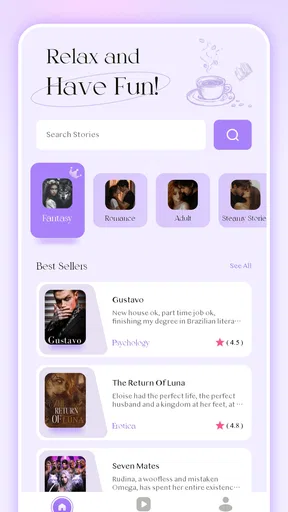
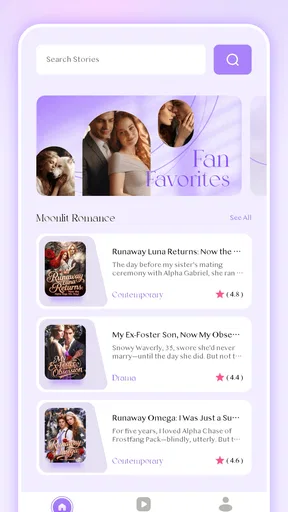
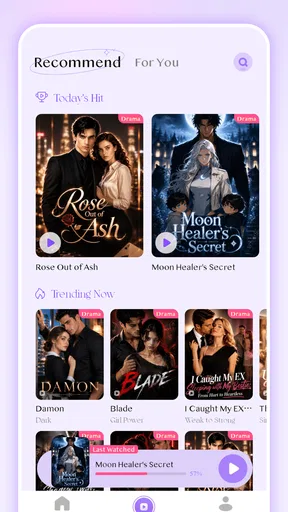
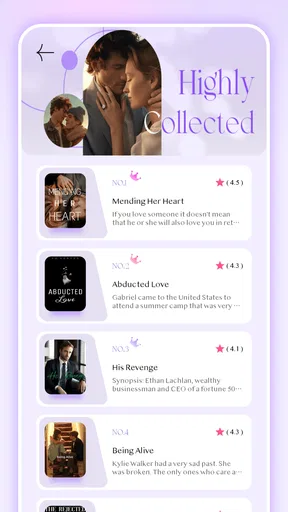
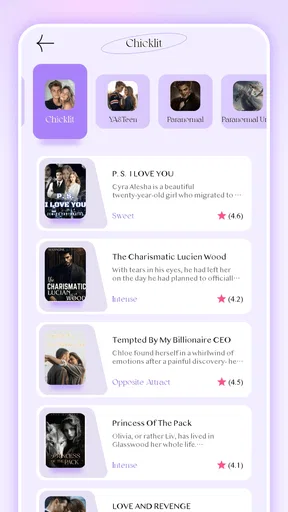
I spent time with Floread - Light Read as an entertainment app built around reading novels in a more immersive way. Its promise is simple: make a story available wherever I happen to be, without turning the experience into a complicated reading project. That simplicity is the main reason I can imagine recommending it to someone who wants fiction close at hand, especially during short breaks or quiet evenings.
Floread is developed by AG Tech Pro and is available free to install, although individual in-app purchases range from $0.99 to $99.99. It carries a Mature 17+ age rating, so I would not treat it as a general family reading app without checking the material first. The app has reached over ten thousand installs and holds a 4.4 average from more than one hundred ratings, which suggests a promising early reception rather than the long-established track record of a major reading platform.
How Floread feels during everyday reading
I look at everyday reading in Floread less as a test of how many pages I can get through and more as a question of whether returning to a novel fits naturally between other tasks. A useful habit is to choose a stopping point before a break ends, so picking up the story later feels intentional rather than rushed. That small routine also gives me a clearer basis for judging the app’s controls and deciding how much I want to rely on it.
Quick access matters more than raw speed
For a novel app, perceived speed is not only about how quickly a screen appears. It is also about how easily I can return to a story, move through a passage, and settle into reading without unnecessary interruptions. Floread’s strongest use case is the small reading window: waiting for an appointment, taking a break, or reading a few pages before sleep. In those moments, an app that gets me to the text without a steep learning curve has a practical advantage over a broader entertainment service.
I would not choose it expecting the same breadth of discovery tools associated with large digital libraries. Floread feels more focused on the act of reading than on building an elaborate media ecosystem around it. That can be refreshing, but it also changes what “fast” means. The value is less about racing through menus and more about reducing the distance between opening the app and continuing a novel.
One useful habit is to treat Floread as a dedicated reading stop rather than an app I casually browse for hours. I found that deciding what I wanted to read before opening it made the experience feel more immediate. This is a small distinction, but it matters when the app is competing with social feeds, video platforms, and notifications that are designed to pull attention in several directions.
Where the lightweight idea works well
The “light read” identity makes sense for readers who prefer manageable sessions. A short commute or a ten-minute pause does not require a full evening setup. I can use that kind of gap to continue a chapter, stop naturally, and return later. This is different from watching a show, where stopping halfway through a scene can feel awkward, or from browsing a large catalog, where choosing something can take longer than the break itself.
Worth Reading Before You Choose

Flipboard Shows What News Apps Must Do Beyond the Feed

Switching to Android Auto Means Rethinking Your Driving Routine

Google Calendar Makes a Crowded Week Easier to Manage

Ludo King Makes the Most of the Minutes Between Plans

Baby Panda World Brings Quick Play to Modern Phones, but Its Game Library Feels Busy

ESPN’s Live Game View Makes Following Close Games Easier
Floread is also a reasonable option for someone who wants entertainment that does not demand sound, headphones, or a large amount of attention at once. Reading fits around a quieter routine. I would especially consider it for a person who already enjoys novels but wants a more convenient mobile habit instead of carrying a physical book everywhere.
There is a trade-off, though. A focused novel app is not automatically the best replacement for every reading method. If I want extensive annotation, deep typography controls, a broad collection of established titles, or a reading system shared across several devices, a more mature ebook platform may be a better fit. Floread’s appeal is its directness, not necessarily its ability to replace every specialized reading tool.
What happens during longer sessions
Short sessions are the natural test for this app, but longer reading exposes different pressures. After several chapters, comfort depends on more than the initial launch. Screen brightness, text presentation, battery condition, and the way I hold the phone all become important. I would use Floread for a longer evening session only after adjusting my device for reading, rather than assuming the app alone will solve every comfort issue.
Heavy use can also mean repeatedly opening and closing the app throughout a day. That pattern is more realistic than leaving a novel open continuously. It gives the phone opportunities to manage memory and gives the reader a chance to see whether returning to the story feels dependable. My practical advice is to establish a simple routine: finish at a natural stopping point, leave the app normally, and reopen it later instead of relying on an interrupted screen to remain available indefinitely.
This approach is useful because it separates app performance from phone behavior. A device with many background tasks, very little free storage, or an aging battery can make almost any reading app feel less responsive. If Floread seems slower after a long day of multitasking, I would first close unused apps and retry before deciding that the reading experience itself is unsuitable.
Stability and recovering from interruptions
Reliability is especially important in a novel app because losing the place in a story is more frustrating than waiting briefly for a screen. I pay attention to what happens after ordinary interruptions: switching to a message, locking the phone, answering a call, or moving between Wi-Fi and mobile data. A dependable reading routine should make it easy to resume without forcing me to reconstruct the last passage from memory.
My recommendation is to make a small recovery check early. Open a story, read enough to establish a clear position, leave the app, and return later. This is more informative than judging the app only from its first launch. It also helps identify whether the phone’s own battery-saving or memory-management settings are interfering with the reading session.
If a session does not resume exactly as expected, I would avoid repeatedly tapping through screens in frustration. First reopen the app normally, then look for the reading position from the same title rather than assuming the last visible page is permanently lost. Keeping the app updated is sensible as well; the current version is 1.2.1, so users should expect an early product that may continue to receive refinements over time.
That early-stage character is worth considering. A rating of 4.4 is encouraging, but the app has only a modest body of public feedback compared with long-running reading services. I see that as a reason to try it personally before making it the only place I keep an ongoing reading habit. For a free download, the test is relatively low-risk, but the decision becomes more significant if I plan to make repeated purchases.
Phone limits and practical device expectations
Floread supports Android 7.0 and later, which covers a wide range of phones but does not mean every device will offer the same experience. Older hardware may handle a simple reading session comfortably while still feeling slower when the operating system is busy. On a newer phone, the difference may be less noticeable, but battery-saving modes and aggressive background restrictions can still affect how smoothly I return to an interrupted session.
For the best results, I would keep reasonable free storage, install system updates that the device supports, and avoid reading with the battery nearly empty. Those are ordinary precautions, yet they matter for a mobile app intended to be used in scattered moments. A reader who uses an older phone should also test the app during both a short session and a longer one before buying anything inside it.
Resource demands are difficult to judge from the reading experience alone. A novel app is naturally less demanding than a game with constant animation or a video service streaming high-resolution content, but that does not guarantee identical behavior on every handset. I would describe Floread as a candidate for everyday mobile reading rather than promise that it will be equally effortless on every Android configuration.
The Mature 17+ rating is another device-sharing consideration. If a phone or tablet is used by several people, especially younger readers, I would not leave access to the app and its content unexamined. The rating does not tell me that every item has the same tone, so the responsible choice is to treat the app as intended for adults and make reading decisions accordingly.
Free entry, paid choices, and reading value
The free installation makes it easy to explore the reading experience before spending money. That is a meaningful advantage over committing immediately to a subscription or buying a large package without knowing whether the app suits my habits. I would begin with a short trial period, paying attention to navigation, resume behavior, and whether the available reading selection matches what I actually want.
In-app purchases run from $0.99 to $99.99 per item. The wide range means I would be particularly careful at the point of purchase. A low-cost individual choice and a high-value package can represent very different commitments, so I would read the purchase screen closely rather than treating every option as a minor add-on. This is one of the most important practical differences between trying the app for free and making it part of a regular entertainment budget.
I would also compare the likely total cost with the alternatives I already use. Physical books offer ownership and a screen-free experience. Library services can be attractive for readers who have access to a strong digital collection. Established ebook stores may provide wider catalog coverage and mature account tools. Floread can win when its reading flow and available novels fit my preferences, but “free to install” should not be confused with every reading option being free.
Who will get the most from it
I see Floread working best for an adult reader who wants fiction available on a phone, prefers short or flexible sessions, and does not need a large set of advanced library features. It suits someone who says, “I have a few minutes; I want to read,” rather than someone who wants to organize an extensive personal archive with elaborate metadata.
A realistic example would be an office worker who keeps the phone nearby during a lunch break. Instead of opening a video app and losing the entire break to recommendations, the reader can use that time to continue a novel, stop after a natural section, and return to work. The same pattern works for a traveler waiting at a station or a student taking a quiet pause between tasks, provided the content and age rating are appropriate.
I would be more cautious about recommending it to readers who require a highly specialized accessibility setup, broad cross-platform synchronization, or a proven long-term catalog. I would also suggest another option for anyone who dislikes reading on a phone or wants to avoid in-app purchasing altogether. Floread is not a universal answer; its usefulness depends on whether its focused approach matches the way someone already reads.
My performance verdict after weighing the trade-offs
Floread - Light Read succeeds most clearly as a convenient entertainment app for mobile novel reading. Its free starting point, adult-oriented positioning, and focused purpose make it easy to test without turning the decision into a major commitment. I like the idea of using it for deliberate, modest reading sessions rather than treating it as another endless feed.
My main caution is that the app should be judged through repeated everyday use, not just a first impression. Try opening and leaving a story, returning after an interruption, and reading during both a quick break and a longer session. Those checks reveal more about practical speed, stability, and recovery than a single launch. They also show whether the phone itself is the limiting factor.
The current release, 1.2.1, and the app’s relatively young presence suggest that I would keep expectations realistic while still giving it a fair chance. The encouraging 4.4 average indicates that many early users have responded positively, but it is not a substitute for checking whether the available reading experience fits my own preferences.
My recommendation is to try Floread if you want a simple way to keep novels within reach and you are comfortable evaluating purchases carefully. I would skip it in favor of a larger ebook ecosystem when catalog depth, advanced reading tools, or a long-established account system matters more than a light, direct mobile reading routine.
Pros
- Clean
- distraction-free interface makes short reading sessions comfortable.
- Lightweight app uses little storage and runs smoothly on older devices.
- Simple navigation helps users move between saved reading materials quickly.
- Useful for fitting brief reading moments into commutes or daily breaks.
- Minimal design keeps attention focused on the text rather than extra features.
Cons
- Limited advanced tools may disappoint readers seeking detailed customization options.
- The small feature set may feel too basic for frequent or advanced readers.
- Content availability can depend heavily on the app’s supported sources.
- Offline reading options may be less flexible than those in larger reading apps.
- Users looking for social
- annotation
- or sharing features may find it restrictive.
FAQs for Floread - Light Read
What is Floread - Light Read, and who is it designed for?
Floread - Light Read is a reading-focused app designed for people who want a calmer and more accessible way to enjoy written content on a mobile device. Its lightweight approach makes it suitable for casual readers, students, and users who prefer a clean interface without unnecessary distractions. It is especially useful if you value quick access to reading material and a simple overall experience.
Is Floread - Light Read free to download and use?
The app may be available to download at no initial cost, but the exact features included in the free version can depend on the platform, region, and current developer policy. Before installing, check the Google Play Store or App Store listing for information about advertisements, subscriptions, in-app purchases, and premium tools. Reviewing those details first helps avoid unexpected charges after downloading.
Does Floread - Light Read require an internet connection?
An internet connection may be needed for downloading content, synchronizing information, receiving updates, or accessing any online reading features. However, whether you can continue reading offline depends on how the app handles saved or cached material. If offline access is important to you, check the app’s current description and test downloaded content before relying on it during travel or in areas with limited connectivity.
Is Floread - Light Read easy to use for extended reading sessions?
Floread - Light Read is intended to provide a straightforward reading experience, so users who prefer uncluttered navigation should find it relatively easy to understand. Comfort during long sessions can still depend on your device, screen size, brightness, text settings, and the type of content being viewed. It is worth exploring the available display and reading options to create a setup that suits your eyes.
What privacy or permissions should users consider before installing Floread - Light Read?
Before downloading Floread - Light Read, review its store listing and privacy information to see what data the app may collect, how that data is used, and whether it is shared with third parties. Also check the permissions requested during installation or first launch. Reading these details is recommended because requirements can change with updates, and privacy practices may differ between Android and iOS versions.


